SAB RNG Controls and UI
Find roll, inventory, luck shop, and the Code button fast so crowded comeback lobbies do not waste your cash.
Why a controls page exists
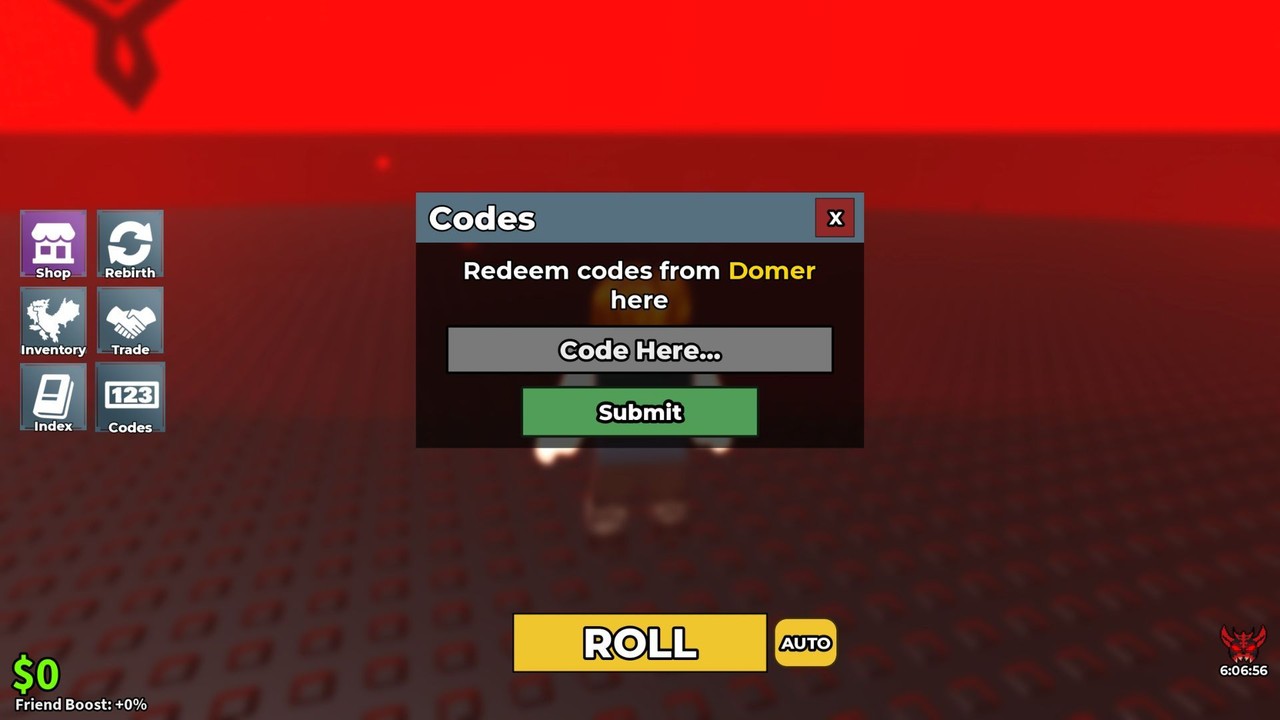
SAB RNG is a Roblox experience with a compact HUD: you roll for brainrots, collect cash, open a luck shop, and (when strings exist) redeem codes from a Code control on the left side of the screen. New players lose their first good cash pile hunting menus. This guide maps the UI so Getting Started can stay focused on strategy.
Server size is 8. When COMEBACK AA or other hype windows fill the lobby, knowing every button by feel matters more than reading another tier list mid-roll.
Core actions (desktop)
| Action | Where to look | Notes |
|---|---|---|
| Move | WASD / arrow keys | Standard Roblox movement |
| Camera | Right mouse drag / trackpad | Keep roll UI readable |
| Jump | Space | Rarely needed for the economy loop |
| Roll / spin | On-screen roll control (main prompt) | Primary progression click |
| Inventory | Inventory / bag style button | Rank keepers after every burst |
| Luck shop | Shop / upgrades panel | Buy the planned node only |
| Codes | Code button on the left | See How to Redeem |
| Chat | / or chat icon | Ask luck questions with context |
Mobile players use on-screen joysticks and tap targets for the same panels. If a button is missing after join, leave and rejoin once before assuming a patch removed it.
First 60 seconds UI drill
- Join from the official place linked on Official Links.
- Locate the roll control and fire one cheap practice roll.
- Open inventory and note how new brainrots appear.
- Open the luck / shop panel and read the next price—even if you cannot buy yet.
- Tap the left-side Code button once so you know the redeem field exists (Codes Hub).
- Glance at chat; mute if noise breaks focus.
Repeat this drill after any client restart. UI placement can feel different on ultrawide monitors, phones, or scaled Roblox settings.
Rolling without misclicks
Misclicks during a cash farming block usually mean:
- Accidental shop opens mid-combo
- Closing inventory before tagging a keeper
- Camera swing that hides the roll prompt
- Chat focus stealing Enter/Return
Fix habits:
- Center the roll control before you start a timed burst.
- Finish each burst with an inventory prune using Brainrots Tier List rules.
- Buy luck only when your Luck Planner reserve hits the target—never as a panic click after a dry streak.
Deep rolling theory lives on How to Roll. This page only keeps your hands on the right widgets.
Code button specifics
GameRant and in-experience UI agree: the redeem entry is a Code control on the left side of the screen. Steps:
- Stand still so movement keys do not fight the text field.
- Open Code.
- Paste exactly (case often matters).
- Confirm redeem feedback.
- Convert rewards into luck via Luck Upgrades before spam-rolling.
Full troubleshooting (button missing, already redeemed, wrong place) sits on How to Redeem Codes. Mid-November 2026 still shows no active codes, but the control remains live for future drops—especially around events like COMEBACK AA.
Inventory and shop ergonomics
Treat inventory as a ledger, not a museum:
- Keep S/A earners visible near the top of your mental list.
- Vendor C/D fuel when you need cash for the next luck node (Luck Priority).
- After a luck purchase, re-open inventory once to see whether new rolls feel different.
Treat the shop as a single-goal panel:
- Highlight one next node.
- Ignore cosmetic-looking sidegrades until S/A odds lines are done.
- Close the shop immediately after purchase so you do not double-buy.
Accessibility and comfort tips
- Lower camera sensitivity if roll prompts blur while turning.
- Increase Roblox UI scale on high-DPI displays if buttons feel tiny.
- Use headphones for roll cues if your lobby is voice-noisy (voice chat is listed as not supported on the place page, but text chat still spikes during events).
- Take a 20-second eyes-off break every few dozen rolls; misclicks rise with fatigue.
Controllers and alternate inputs
Roblox controller support varies by platform. If you play on gamepad:
- Remap so the primary face button hits roll reliably.
- Confirm text entry for codes still works (often easier to redeem codes on keyboard/mobile once, then return to controller for rolling).
- Prefer simple camera reset binds before long farm blocks.
If controls feel broken after a Roblox client update, test another experience. Client-wide input bugs are not SAB RNG patches—check Updates only when the in-experience panels themselves moved.
Common UI problems and fixes
| Symptom | Try this |
|---|---|
| No Code button | Rejoin; confirm correct place ID; read redeem guide |
| Shop prices blank | Wait for replication; rejoin once |
| Inventory not updating | Close/reopen panel; avoid spam clicking |
| Roll does nothing | Check cash/energy requirements; leave AFK kick |
| Everything tiny/huge | Roblox Settings → Experience → UI scale |
Still stuck? Ask in Discord with a screenshot using templates from Players FAQ.
Practice plan (five minutes)
- Join → locate roll, inventory, shop, Code (60s).
- Ten surplus rolls with camera locked (90s).
- One inventory prune (60s).
- Open shop, say the next node name aloud, close shop (30s).
- Open Code, close Code, ready for real session (30s).
After that drill, return to Getting Started or jump into a COMEBACK AA prep checklist.
Related reading
Hands first, theory second. The loop only works when every click lands on purpose.
Frequently Asked Questions
Quick answers to the most common questions.
Where is the SAB RNG code redeem button?
On the left side of the screen. Open Code, paste the string, and redeem. Full steps are on the How to Redeem guide.
What are the basic SAB RNG controls?
Use standard Roblox movement, the on-screen roll control for spins, inventory for keepers, the luck shop for upgrades, and the left-side Code button for promos.
The Code button is missing—what do I do?
Leave and rejoin, confirm you are on place 125834179068379, then retry. If it still fails, ask in Discord with a screenshot.
Should I play SAB RNG on mobile or PC?
Both work. PC is usually easier for precise camera and code pasting; mobile is fine if you enlarge UI scale and redeem codes carefully.
Why does UI knowledge matter during events?
Servers only hold eight players. During comeback windows you cannot afford to hunt menus while luck or cash opportunities pass.